
We All Need a Sanctuary. Join Mergemon Wilds Now!
Rescue, hatch, and grow adorable Mergemon, build a safe cozy village, and merge magical elements to save the Glimmerwild from the corrupting darkness.


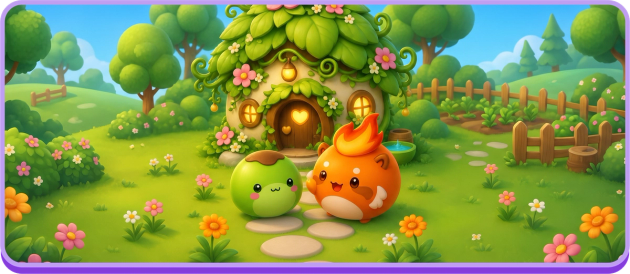
CUTE, YET FIERCE. YOURS TO PROTECT.
Mergemon Wilds is a cozy free-to-play, mobile-first merge game where you rescue and collect magical creatures called Mergemon. Rescue Mergemon, hatch and merge them to help them grow, fill merge orders with their elemental magic, and build a blooming village sanctuary full of life.
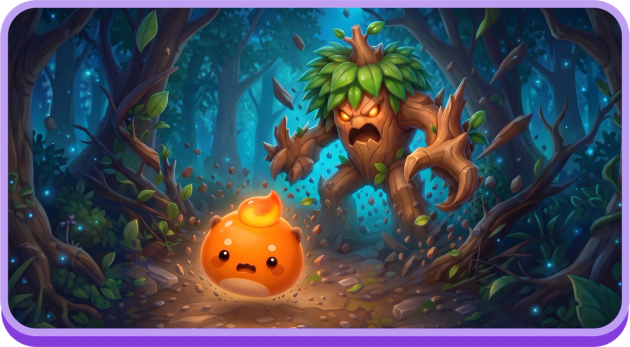
RESCUE
Rescue & Collect Magical Creatures
Darkness has trapped adorable Mergemon across the Glimmerwild, and they need your help. Free them, welcome them into your collection, and discover the personality each one brings.

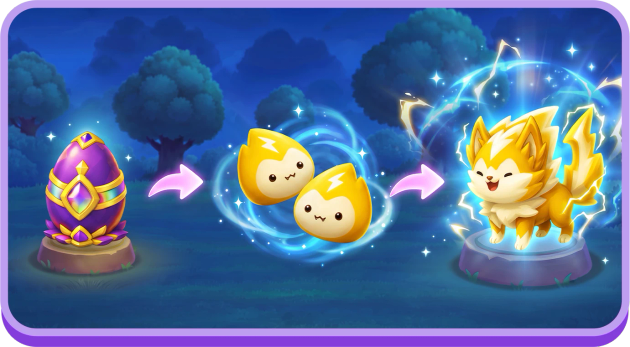
HATCH
Hatch Eggs & Merge to Grow
Hatch magical eggs to meet new Mergemon, then merge matching pairs to help them grow. Every new level reveals a brand-new look, so there's always a delightful surprise waiting in your collection.
BUILD
Build & Decorate a Cozy Village
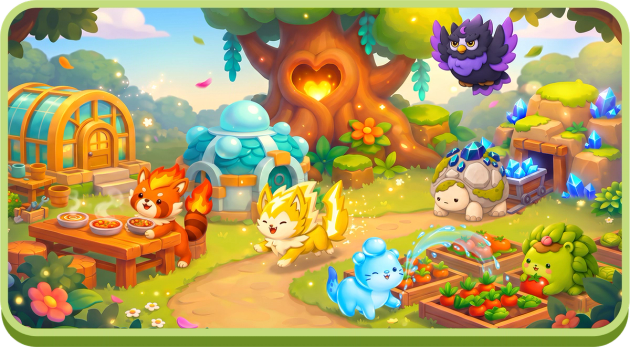
Every rescued Mergemon needs a safe sanctuary. Build a cozy village alongside your Mergemon, watch it grow, and decorate every corner until it feels like home.
MERGE
Fill Merge Orders with Elemental Magic
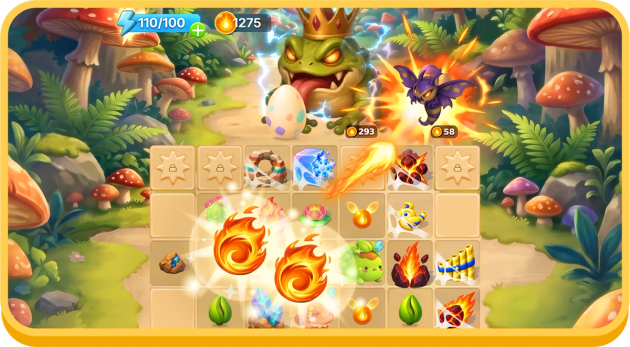
Mergemon are your greatest allies against the darkness. Tap them to conjure Fire, Water, Spark, and more onto the board, then merge their magic to fill orders and set more Mergemon free.
FAQ
Frequently Asked Questions
What is Mergemon Wilds?
Mergemon Wilds is a cozy free-to-play, mobile-first merge game where you rescue and collect magical creatures called Mergemon. Rescue Mergemon, hatch and merge them to help them grow, fill merge orders with their elemental magic, and build a blooming village sanctuary full of life.
How do I contact Mergemon Wilds support?
Visit the Mergemon Wilds Help Center to browse answers or contact our support team. You can also reach support from inside the game.
Where can I get the latest Mergemon Wilds news?
Follow Mergemon Wilds on Facebook for new Mergemon, events, updates and community news.
How does merging work in Mergemon Wilds?
Merging is the heart of Mergemon Wilds. Your Mergemon are the generators on your merge board. Tap one, or hold it to tap automatically, and it creates an elemental item in the nearest empty cell. Each tap costs 1 Energy. Two identical items merge into one item of the next level. As the game puts it: “Merge 2 identical items to discover something new!”
Every element has two item families:
- Attacks go from Level I to Level XVI, for example Fire Attack I up to Fire Attack XVI.
- Spells go from Level I to Level X.
Select any item to see its name and level, or to sell it.
Along the top of the board, corrupted creatures and caged Mergemon show order cards. Each card lists the items it needs and the FyreLight it pays. When you have the right item, a green tick appears; tap the card to deliver it. Completed orders earn FyreLight and fill the Boss Meter. A Boss appears after every 7 orders, usually holding an egg. Special visitors pay out extra rewards:
- the Energy Bug pays out Energy;
- the Gem Snail pays out Gems;
- the Loot Goblin pays out treasure chests.
The board also hides cobwebbed cells. Merge a matching item onto a cobweb to free that cell for good. Some cobwebs only open at higher player levels. From player level 3, merging higher-level items can sometimes create a bonus copy inside a bubble. Unlock it with Gems or an ad before it bursts.
Want more detail? Read the full Merge guide (PDF).
What elements are there in Mergemon Wilds?
Every Mergemon belongs to an element, and each element has its own family of merge items. The elements today, with the Mergemon who leads each one:
- Fire: Ember
- Water: Dewdrop
- Nature: Sprout
- Spark: Sparkie
- Earth: Pebble
New elements and elemental friends may join the Glimmerwild in future updates.
Each Mergemon is a generator on your merge board: tap Ember for Fire items, Dewdrop for Water items, and so on. Every element has Attacks (Level I to XVI) and Spells (Level I to X), such as Fire Attack I or Water Spell II. A Mergemon’s level decides how powerful its items are. A Level 1 Mergemon creates only Level I Attacks; higher-level Mergemon add Spells and higher-level items.
Elements matter because orders ask for specific items. One corrupted creature might want a Fire item, while another asks for two items of different elements. A crew that covers several elements can answer more orders.
You start with Ember, the little Fire Mergemon who asks for help in the very first scene. More elemental friends arrive as you play. Story goals such as “Rescue the Nature Egg” and “Rescue the Water Egg” lead you to eggs that hatch Mergemon of new elements. Your Collection records every Mergemon you’ve found and every Elemental Attack and Spell you’ve created.
Where do Mergemon eggs come from, and how do I hatch them?
New Mergemon join your crew in two ways: you rescue them, or you hatch them from eggs. You earn eggs as you play:
- Bosses: every 7 completed orders fill the Boss Meter and summon a Boss. Fill its order to rescue its egg (“Defeat the Boss to rescue the Egg!”). Some Bosses give a basket of eggs or a treasure chest instead.
- Story goals: Quests such as “Rescue the Water Egg” point you to a special Boss holding a story egg.
- Events and offers: the weekly “Dewdrop’s To-Dews” goals can reward a Rare Egg, and some Store offers include eggs.
When you get an egg, you’ll see “Egg Rescued” and “Hatch your Egg in the Hatchery!” The Hatchery sits beside the HearthTree in your Village. Place the egg in a nest and its timer starts:
- Common Egg: 20 minutes
- Rare Egg: 4 hours
- Epic Egg: 8 hours
- Legendary Egg: 16 hours
- Story eggs: a few seconds
Timers keep running while you’re away. When an egg is ready, you’ll see “Your egg is ready! Tap to hatch it.” Some eggs hatch several Mergemon at once, shown as “Twins!” or “Quadruplets!”.
You have one free Hatchery slot. A second slot costs 250 Gems for 7 days; if the rental ends while an egg is inside, the egg keeps hatching, and you can rent the slot again. A third slot is shown but isn’t available yet. To speed up an egg, spend Gems or watch an ad to take 15 minutes off its timer, up to 3 times a day.
Want more detail? Read the full Rescue & Collect guide (PDF).
Want more detail? Read the full Hatch & Grow guide (PDF).
How do I level up my Mergemon?
Your Mergemon level up when you merge two identical Mergemon in your Village. Find two of the same Mergemon at the same level, such as two Level 1 Embers. Pick one up and drop it on the other. The tutorial calls this a hug: “Pick up this Ember and drop it on the other one to give them a hug!” The pair becomes one Mergemon of the next level. Watch for the “Merge available!” prompt and the “Leveled Up!” celebration. Leveling up is free: it costs no FyreLight, Gems or Energy. Matching Mergemon gather together in the Village, so pairs are easy to spot.
Mergemon go from Level 1 to Level 9. Every level brings a brand-new look, with its own idle and walking animations as they wander the Village. Each Mergemon’s tag shows its level, for example “LV 2”.
Leveling up also makes your Mergemon stronger on the merge board. Each Mergemon is a generator, and the board always uses your highest-level copy. Higher-level Mergemon create higher-level elemental items:
- Level 1: only Level I Attacks.
- Level 2: Spells start appearing. Ember says, “Now I can cast fire spells!”
- Levels 8 and 9: Attacks up to Level V and Spells up to Level III.
Bigger starting items mean fewer merges to fill tougher orders.
To get more copies to merge, hatch eggs (some hatch twins or more) or use the Mergemon Lure in the Store, which always gives a Level 2 or higher Mergemon. Each new level you reach also adds a Collection entry worth 5 Gems.
Want more detail? Read the full Hatch & Grow guide (PDF).
Can I decorate my village?
Yes. Decorating is how your Village becomes truly yours. As you complete Quests and your Mergemon’s homes appear, Decoration Spots open around the Village: 24 in all, in medium and small sizes. The tutorial shows you how: “Tap this plot of land to place a decoration!” Tapping a spot opens the Decoration Spot picker. Each option shows a small counter, so you can track what you own and what you’ve placed.
Your first decorations come from the “Room to Grow” quest: the Sprout Berry Bed and Sprout Tomato Bed. Later quests add:
- the Dewdrop Fountain
- the Pebble Blue Mineral
- the Sparkie Crystal Lamp Post
- the Ember Torch Lamp Post
The picker also includes options such as Wheat Beds, Cabbage patches and Fire Scales. If you’re already past a decoration quest, you still receive its reward.
Limited-time events can add special decorations. The Pond Pals event, for example, offered a Pond Statue and a Koi Pond. Items marked “Coming soon!” preview what’s on the way, and messages like “Complete [quest] to earn [decoration]” tell you exactly how to unlock each one.
Decorations sit alongside the homes, scenery and HearthTree that appear as your Village grows. Every spot you fill makes the place cozier as your Mergemon wander its paths.
Want more detail? Read the full Build & Decorate guide (PDF).
How does my village grow?
Your Village grows through Quests, which you complete with FyreLight. You earn FyreLight by completing orders on the merge board; each card shows its payout, and tougher orders pay more. FyreLight works as your experience: spending it on the next Quest also moves you toward your next player level.
Quests tell the Village’s story one step at a time, as Ember and friends ask for help. Completing them does four things:
- Builds homes for your Mergemon. Ember’s house comes first, in “A New Home”. Later homes come in Quests such as “Sprout’s Roots”, “Dew Come In”, “Rock and Hearth Place” and “Ohm Sweet Ohm”.
- Pushes back the darkness. Walls of forest clear, color returns to new parts of the Village, and new paths open for your residents.
- Grows the HearthTree. The great glowing tree at the center of the Village grows from HearthTree Grove all the way to Everlight HearthTree.
- Adds more to the Village, including scenery such as a wooden arch bridge and a wishing well, new Decoration Spots, and a mailbox where Melvin the Mail Snail delivers notes and gifts.
Some Quests need a new friend first, which sends you back to the board to rescue an egg. Every Mergemon you hatch and every friend you rescue moves in and wanders the paths, so the Village gets livelier as it grows. The goal bar at the bottom of the Village screen always shows your next step.
Want more detail? Read the full Build & Decorate guide (PDF).
What is Energy?
Energy powers your merge board. Every tap on a Mergemon to create an item costs 1 Energy. Your Energy bar sits at the top of the screen. It holds up to 100 Energy and refills by 1 every 2 minutes.
Ways to top up:
- Energy items: Energy I to Energy V appear on the board, in chests and as rewards. Collect them for 4, 9, 20, 45 or 100 Energy. They can take you above your usual 100 limit.
- Special orders: the Energy Bug family (Spark Bug, Charge Bug and Surge Bug) pays out Energy items.
- Leveling up: each new player level gives you Energy.
- Free refill: the first time you run out, the game gives you a free refill.
- Get Energy screen: refill 100 Energy with Gems, or watch an ad for 25 Energy a limited number of times a day.
- Events: the weekly “Dewdrop’s To-Dews” goals include Energy rewards.
Energy Surge unlocks at player level 12: each tap uses 2 Energy and creates an item one level higher. Max Surge unlocks at level 20: each tap uses 4 Energy and creates an item two levels higher. Both are a great way to make bigger items faster when your bar is full.
Tip: create with a purpose. Check what your orders need before you tap, so every point of Energy moves you toward a reward.
What if my merge board is full?
When there’s no free cell, the game shows “BOARD FULL” and suggests “Use Storage”. Ways to make room:
- Merge first. Any two identical items become one, freeing a cell. Keep matching items together so pairs are easy to spot.
- Fill orders. Completing an order card removes the items it used.
- Collect rewards. Tap FyreLight, Energy and Gem items to collect them. Treasure Chests open instantly and spill 3, 5 or 8 items, so leave space before opening one.
- Use Storage. Storage is available from the start with 4 free slots. The 5th slot costs 20 Gems, and each slot after that costs 20 Gems more than the last, up to 40 slots.
- Sell what you don’t need. Select an item and sell it for FyreLight. There’s an Undo option if you change your mind.
- Clear cobwebs. Merging a matching item onto a cobwebbed cell frees it permanently, so your board grows as you play. Some cobwebs only open at higher player levels.
- Deal with bubbles. A bonus item in a bubble can be unlocked with Gems or an ad. If you leave it, it soon bursts into FyreLight.
Prevention helps too: create with a purpose, save high-level items for tougher orders, and merge before tapping your Mergemon again.
Can I play Mergemon Wilds offline?
No. Mergemon Wilds needs an internet connection to play. Egg timers in your Hatchery keep running even if your connection drops.

Come Sit by the Fire
The village is growing, and there's always room for one more.
Follow us to stay close to the adventure: new Mergemon, new stories, and a community that feels like home.

In-Game Purchases (Includes Random Items)